
A veteran database engineer has shown how to run 1,000 standalone SQLite databases inside SQL Server by storing each one as a binary value in a table row. The SQLite in SQL Server approach loads a database into memory only when a query needs it, and it came out of a weekend of tinkering with UK Parliament speech data.
It targets a narrow problem: many tenants who each want their own schema, without thousands of separate databases to maintain.
The problem it solves
Picture an internet provider hosting 10,000 small customer sandboxes. Every tenant wants to run CREATE TABLE, invent columns and download their data when they leave.
The usual options all hurt. Ten thousand databases on one SQL Server instance strain file handles, recovery checkpoints, backups and memory. Putting everyone in one shared database with half a million tables makes system object contention a full-time job. A single fixed table gives nobody their own schema or a clean export.
The idea here is simpler. A SQLite database is one file, and a file is bytes. So store the whole file in a VARBINARY(MAX) column and mount it in memory on demand.

How the two-row design works
Windows 11 and Windows Server already include a native SQLite library, winsqlite3.dll, in the System32 folder. A small C# SQLCLR assembly takes the extracted bytes, passes the pointer to sqlite3_deserialize(), runs the query entirely in RAM and returns rows to T-SQL through CROSS APPLY.
Alone, that has a flaw. SQL Server can’t see inside a binary blob. A question like “which MPs spoke about energy above a certain score” would force it to read all 409 MB of blobs and open 650 SQLite engines. Changing one number in a 6 MB blob would also log a 6 MB rewrite.
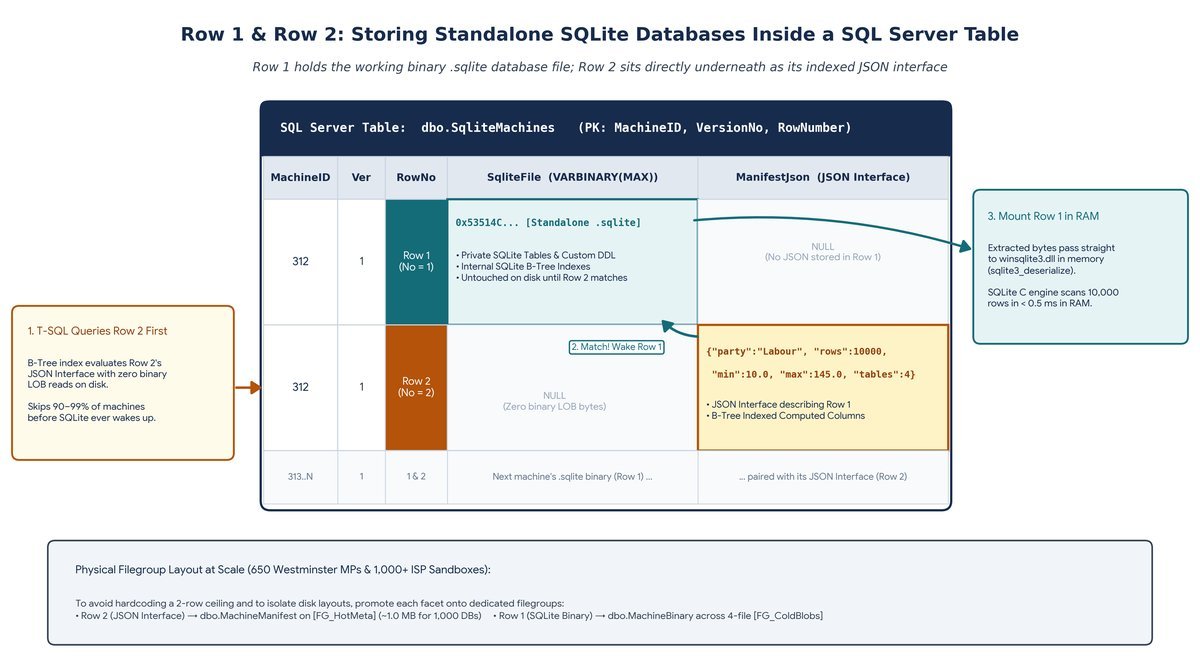
The fix is a second row. Row 1 holds the working .sqlite file. Row 2 sits beside it as an indexed JSON manifest, so the host can filter without touching the blob. A small relational change log handles writes.
In the full test rig these became separate tables sharing a key of machine ID and version number. That keeps hot metadata and cold blobs on different filegroups, and it lets new facets, such as 384-dimension vectors, be added without stuffing one table with nullable columns.
The test numbers
The author ran two synthetic workloads on a home workstation with an Intel Core Ultra 9 285K, 192 GB of DDR5 and NVMe drives. One had 650 Westminster constituency databases of 10,000 speeches each, 6.5 million speeches in all, totaling 408.8 MB. The other had 1,000 tenant sandboxes of 1,000 rows each, totaling 78.1 MB, about 78 KB apiece.
For the tenant case, all 1,000 JSON manifests fit in 1.00 MB on the hot filegroup. The cold SQLite files spread across four data files at 22.06 MB, 22.00 MB, 22.00 MB and 21.94 MB. Storing 650 constituency vectors of 384 floats (249,600 numbers) moved the hot filegroup to 2.19 MB.
No SQL Server timing figures were published. Clause 5 of the SQL Server 2025 licence, which covers the free Developer Edition, forbids releasing benchmark results without Microsoft’s written approval. SQLite is public domain, so its in-memory behaviour could be measured freely.
Pruning before opening anything
The vectors were produced by a local Python service on two RTX 5090 cards, kept outside the database process so a bad driver update can’t take SQL Server down. SQL Server 2025 calls it over localhost.
In one query, cosine distance under 0.10, the party Conservative and a maximum score of 135.0 or more ruled out 647 databases without reading cold storage. Only three files, 1.9 MB in total, were opened in RAM. SQLite counted all 2,237 matching speeches in a couple of milliseconds.
Three bugs along the way
A scalar function referenced three times in one SELECT built every SQLite database three times over, until the blobs were materialized first. A party-assignment formula using modulo 4 made a high-scoring Conservative impossible in the test data. The third was positive: filegroups balanced as expected.
When it makes sense
If every tenant shares the same columns and nobody needs a downloadable file, a normal indexed table with GROUP BY will win easily. The pattern fits three jobs: a public archive where anyone can download one constituency’s file, a host giving 10,000 customers real DDL freedom while backing up one database, and a zero-cloud rig for rehearsing schema upgrades across 500 shards.
Cloudflare D1 and Turso, recently picked up by Supabase, already give each customer a SQLite database, but a query across all tenants there becomes a thousand HTTP requests.
What to try next
Anyone testing SQLite in SQL Server should start with the manifest design, since that’s what keeps the large blobs on disk. Measure your own workload on your own licence terms before committing.
Source: sqlartist.github.io