
A new command-line tool called sjq is a jq-compatible JSON filter that runs the same filters as jq at far higher speed. On a 1 GB file of tweets, it finished in 0.05 seconds with multiple threads, around 210 times faster than jq 1.8.2.
It comes from Daniel Lemire and the team behind the simdjson parser, and runs on top of that library. sjq is new, and the developers ask users to report any filter that fails or gives a different result.
The benchmark
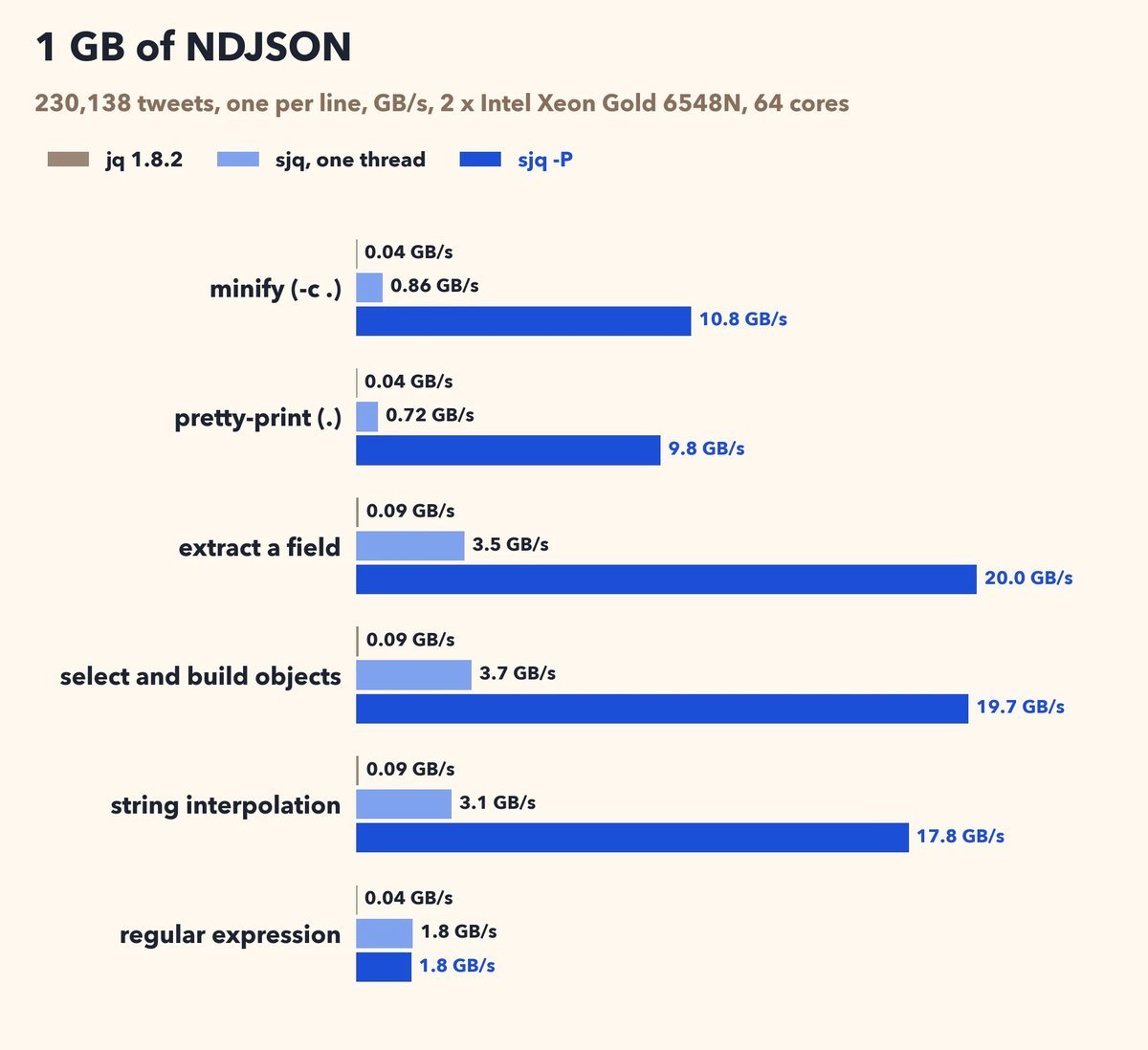
The test file holds one tweet per line, 230,138 tweets in all, in the NDJSON format commonly used for logs. The filter pulls the account name out of each tweet’s user object.
jq 1.8.2 needs 11.5 seconds for that job, which is less than 0.1 GB/s. On a single thread, sjq takes 0.31 seconds. That’s 3.5 GB/s, roughly 37 times faster, and one thread is the default.
Adding -P makes sjq launch a worker for each available processor, capped at 32, because the main thread handles output and more workers wouldn’t speed that up. On a 64-core server, sjq used 32 threads and finished the same filter in 0.05 seconds, or 20 GB/s. You can set a thread count with –threads n, or use every processor with –threads 0.
What jq does well and where it slows down
jq is popular because its filter language is expressive and it is available almost everywhere. A filter is a small program that runs on each JSON document, such as one that prints the account name from every tweet in a log. That generality has a cost on big files, and the benchmark shows it plainly: the same job that sjq finishes in a fraction of a second takes jq nearly twelve seconds.
Because sjq reads the jq language, nobody has to learn a new syntax or rewrite existing scripts to try it. Swapping the command name is the first test to run on a real workload.
Why it’s so fast
Three things explain the gap.
- Parsing is most of the work in a JSON filter, and simdjson is built for speed there.
- For filters that just navigate and pick values, sjq decodes only the parts it must. To read the account name, it never examines a tweet’s text or entities.
- Logs are many small documents, so -P cuts the file into chunks that workers filter in parallel. Results are written back in their original order, matching what one thread would print.
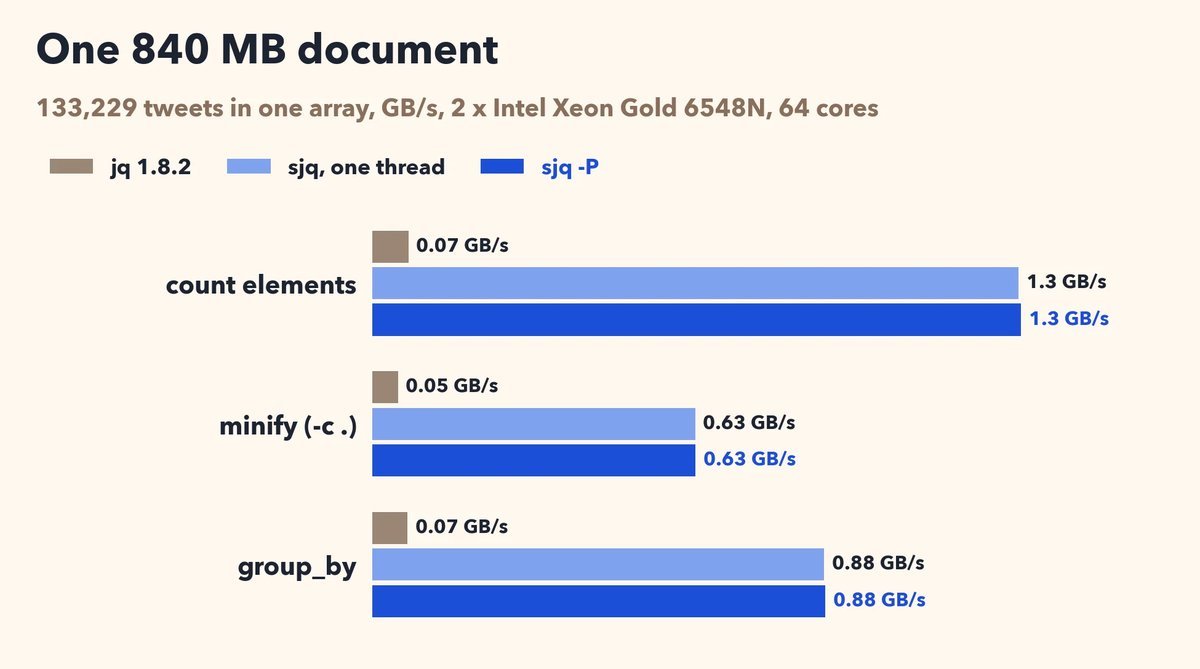
A single huge document is harder, since it can’t be chunked. sjq stays on one core there and still beats jq by a factor of 12 to 18.
How compatible it is
The team pointed jq’s own test suite at sjq. It passes 728 of the 781 tests. Most misses involve jq modules, integers beyond 64 bits, extreme nesting past 10,000 levels and differences in error message text.
Everything in the jq tutorial runs as written. Users can define functions, use reduce and foreach, interpolate strings, emit @csv or @base64, update with |=, match regular expressions, handle dates and pass –arg or –slurp. Two differences are worth knowing: regular expressions use the C++ standard library’s syntax, and dates are in UTC.
A readable output option
sjq adds something jq lacks. jq prints JSON as a single compact line or as a long pretty-printed column. The –fractured option switches sjq to the FracturedJson layout: small arrays and objects fit on a single line, and lists of similar records become aligned tables. That makes a sample of records far easier to scan.
Installing it
On Linux and macOS, a one-line install script from the project’s GitHub repository sets it up, and Windows has a PowerShell equivalent. Homebrew works on macOS and Linux, and Scoop on Windows.
Linux builds are statically linked, so one binary works across distributions, on 64-bit x64 and ARM chips alike. At startup, simdjson detects the processor and picks the fastest code it supports.
What to watch as sjq matures
Teams that filter large log archives have the most to gain, since the speedup grows with file size and core count. The open question is how far the 53 failing jq tests matter in daily use. For most pipelines the gaps look narrow, but anyone relying on modules, very large numbers or exact error text should test before switching.
Source: Daniel Lemire's blog