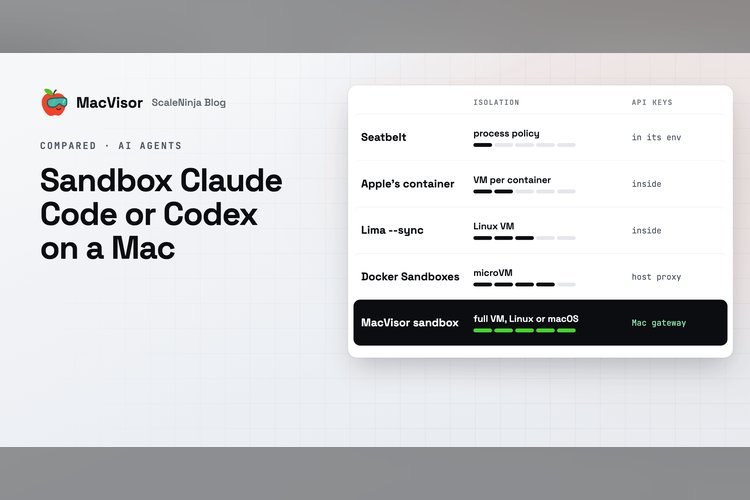
Running an AI coding agent on a Mac with its permission prompts off is the setup where it works best, and the one where it can do the most harm. The core issue with any Mac AI agent sandbox is simple: the agent acts with your account’s rights, sitting beside SSH keys, cloud credentials and every other project on the disk.
The comparison covers Claude Code, Codex CLI and Gemini CLI, and weighs six ways to contain them: macOS’s built-in Seatbelt, Apple’s container tool, Lima and Colima, Docker, and a full virtual machine.
What needs protecting
There are four targets. Files come first: other projects, ~/.ssh and ~/.aws. Then keys, meaning API keys in variables or .env files, the SSH agent and git credentials. The network matters because anything the agent can read can be sent to any host it can reach, including devices on your LAN. Last is delayed execution: after a session, an edited git hook, CI file, package.json script or agent settings file can run on your Mac.
Why the network is part of the boundary
A sandbox limits reads, and the network decides whether those reads escape. Unprompted agents take in READMEs, issues, web pages and package code from strangers, and any of it may hide instructions. Anthropic’s own documentation warns that wherever network egress is allowed, data the agent can see may still leak.
The comparison names three controls for unattended agents. Deny by default and permit only the model API and whichever package registries the project uses. Keep the agent off your local network and off the Mac itself, since a VM on ordinary NAT can reach the router admin page, a NAS, printers and local dev databases. Enforce the rules outside the guest, because iptables inside a container holds only while the agent lacks root, and agents installing packages often get it. If a filter covers only IPv4, IPv6 needs closing too.
Seatbelt: handy, but not a boundary for unattended runs
All three agents can wrap commands in Seatbelt, so nothing needs installing. It is a policy on a process, with the same kernel, user and disk. In Claude Code’s /sandbox, Bash commands may write only to the working directory, a temp folder and folders you add, yet reads cover the whole machine, ~/.ssh included, and environment variables carry through. The sandbox wraps shell commands alone, so file tools, hooks and MCP servers run on the host. In bypass-permissions mode, hosts outside the allow list are permitted without a prompt unless strictAllowlist is set.
Codex defaults to workspace-write, protects .git, .codex and .agents as read-only and leaves network access off. Its –yolo flag removes the sandbox entirely. Gemini CLI’s sandbox is opt-in, and its default macOS profile allows broad reads and network access. Apple marks sandbox-exec as deprecated, but it runs fine on macOS 27.
Containers and VMs
Apple’s container tool, free under Apache 2.0, gives each Linux container its own lightweight VM. It needs Apple Silicon and macOS 26 or later, and version 1.7.1 shipped on 6 November 2026. It has no egress filter, so the container reaches whatever the Mac does.
Lima 2.3.0, out the same day, mounts the home folder read-only by default, which still exposes ~/.ssh. The suggested fix is –mount-none with its –sync mode, which copies the project in, runs the agent and asks before accepting a diff. Use 2.3.0 or later, because older versions let the guest change files after a diff was approved. Colima mounts $HOME writable by default, so change that first.
Anthropic’s reference dev container uses a default-deny iptables firewall, but a malicious project can still reach anything inside the container, credentials included. Docker Sandboxes (sbx) run each sandbox as a microVM with its own kernel, keep raw credentials out of the VM through a host proxy and deny outbound traffic by default. Use –clone so edits don’t land on your Mac at once, and trim the broad default allow list.
The full-VM option is MacVisor, which is paid after a 30-day trial and in Tech Preview for AI sandboxes. It keeps keys in the Mac’s Keychain, enforces an allow list outside the VM, shows a diff on the Mac and takes a checkpoint of the whole VM. Its own downsides: gigabytes of memory per sandbox, about a minute to create one, and a limit of two macOS VMs.
Which to pick
- Watching the agent and wanting fewer prompts: the agent’s own sandbox.
- A free Linux project: Docker Sandboxes with –clone.
- Open source preferred: Lima 2.3 or later, with a low-limit key.
- A team setup: the reference dev container.
- A throwaway shell: Apple’s container, mounting only the project.
- macOS or Xcode work, or keys kept out of the guest: a full VM.
No sandbox stops prompt injection. It narrows the damage: what an injected instruction can see, where it can send it, and what reaches your code.
Next steps for Mac developers
Layering is allowed: Anthropic itself suggests nesting the Bash sandbox in a container or VM to get a second boundary. Anyone planning to leave an agent running unattended should settle the network rules before choosing the tool.
Source: ScaleNinja