Herdr coding agents get a persistent home in a new terminal tool that keeps several agent sessions running and shows which one needs a human. Version 0.9.5 of the terminal runtime is the stable release, and a customizable desktop app now sits alongside it.
The pitch is attention, not agent count. Starting another agent is cheap. Remembering what each one was doing, and which one is waiting on you, is the hard part.
A background server owns the terminals
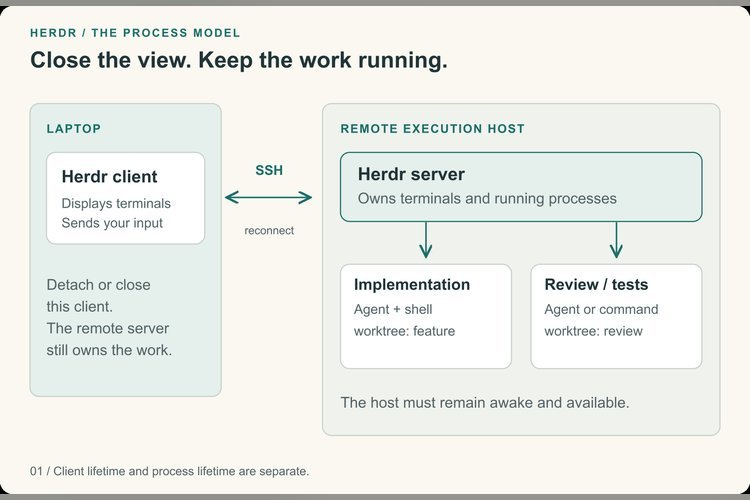
Herdr starts a background server that owns the terminal processes. A separate client connects to show them and pass along keystrokes. Close the client and the server keeps going, so shells, agents and tests inside its panes carry on.
The structure is simple. A session holds workspaces, a workspace holds tabs, and a tab holds panes. Each pane is a real terminal, and a recognized agent is just a process inside one. A pane can equally hold a test runner, a dev server or an ordinary shell.
For remote work, you can SSH into a machine and start Herdr there, or connect from your own machine with herdr –remote workbox. Several SSH machines can be saved and shown in one window. Each keeps its own server and processes, so one dropped connection doesn’t take down the rest.
Status badges for Claude Code, Codex and others
Terminal multiplexers already handle many terminals. What Herdr adds is an agent view. It detects Claude Code, Codex, Pi and OpenCode and labels each one as working, blocked, done or idle. An unknown state covers anything it can’t classify with confidence.
That turns “what’s in terminal seven?” into “which task needs an answer?”
The status is an observation, not proof. For some agents Herdr reads the foreground process and the live screen. Others report state through integrations. A fresh approval dialog can slip past the screen rules and look idle, so the badge helps navigation but shouldn’t stand in for reading what the terminal is asking you to approve.
Isolation needs care too. Three panes pointed at one directory still share files and a git index. Herdr includes worktree commands, but parallel editing only works if you or your workflow picks that isolation. A worktree separates files. It doesn’t create a security sandbox or give each agent its own database and ports.
What persistence covers and what it doesn’t
“Resume” can mean three things: reattaching to a live process, rebuilding a terminal layout, or reopening an agent’s conversation.
Herdr keeps processes alive when a client detaches. If the server restarts, the saved layout returns, though the processes that filled it don’t. Supported agent integrations can resume conversations, and optional screen history can replay terminal contents. Neither brings back an interrupted test run.
The host matters as well. A local server can’t keep working while your laptop sleeps, but one on an awake remote machine can. Herdr supplies the connection and session structure. You supply the machine, its uptime and the credentials the agents need.
Scripting agents from the CLI
Herdr exposes a CLI and a local socket API. Scripts can open a workspace, launch an agent in a pane, feed it a prompt, read what it printed and block until it reaches a given state. Pane commands address a terminal. Agent commands address whichever recognized agent currently occupies it.
In the documented pattern, one command creates a workspace and returns JSON, jq extracts the pane ID, and herdr agent start reviewer –kind codex launches a Codex agent there. It needs a running server, jq and an authenticated Codex CLI. Pane IDs should come from command output, never be guessed.
A completed wait is also different from a blocked agent. When an agent stops to ask for a decision, whatever coordinates it must read that question before replying. Opening four panes doesn’t answer who owns a change, what a reviewer checks or what happens on failure.
Where it fits among similar tools
tmux already keeps remote commands alive after an SSH drop, and an existing setup with the right hooks may be enough. Zellij restores layouts and saved commands, with optional history. For Herdr coding agents, the draw is the agent view and agent-specific controls.
cmux is a Mac-native terminal on top of Ghostty. It has vertical tabs, alerts when an agent wants attention, a scriptable browser and SSH support. It suits a Mac setup with a browser beside the agent. Conductor runs first-party coding agents in cloud sandboxes, so you skip machine setup. Herdr instead connects to a host you control, with its existing repositories and network access, and you maintain it.
For a single task, the agent’s own CLI may be all you need.
Trying Herdr on one remote task
On a machine with Homebrew, install with brew install herdr, change into your project and run herdr. Start your usual agent in the pane. Detach with Ctrl+B, release, then Q, and run herdr again to reattach.
A fair test is one long task you leave alone, then an independent one beside it. Do the badges save you from checking terminals? Can you find the work after disconnecting? Is review easier? Those answers say more about Herdr coding agents than how many fit on a screen.
Source: NGrislain