A Claude Code agent can work unattended on a rented server without touching your laptop’s SSH keys and cloud credentials. One developer’s recipe boxes it into a Docker container behind a firewall that denies everything by default, switches off permission prompts inside that box, and sends tasks from a phone through Remote Control. This Claude Code VPS setup took one server and a few files.
Why not run it on the laptop
For most people, Claude Code lives on the machine that also holds their SSH keys, cloud credentials and every repo they can push to. The author considers that a poor home for an agent, particularly when the work is for clients. They also wanted to hand Claude a task, close the laptop and check progress from a phone.
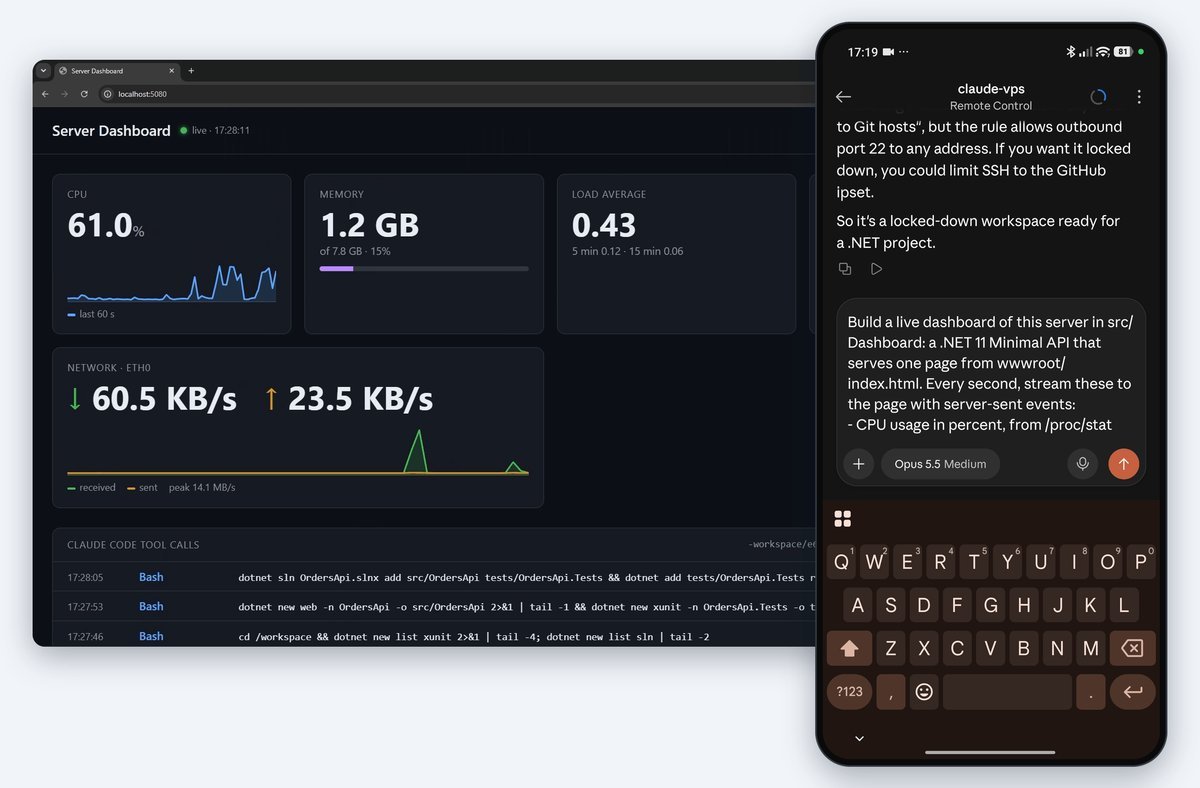
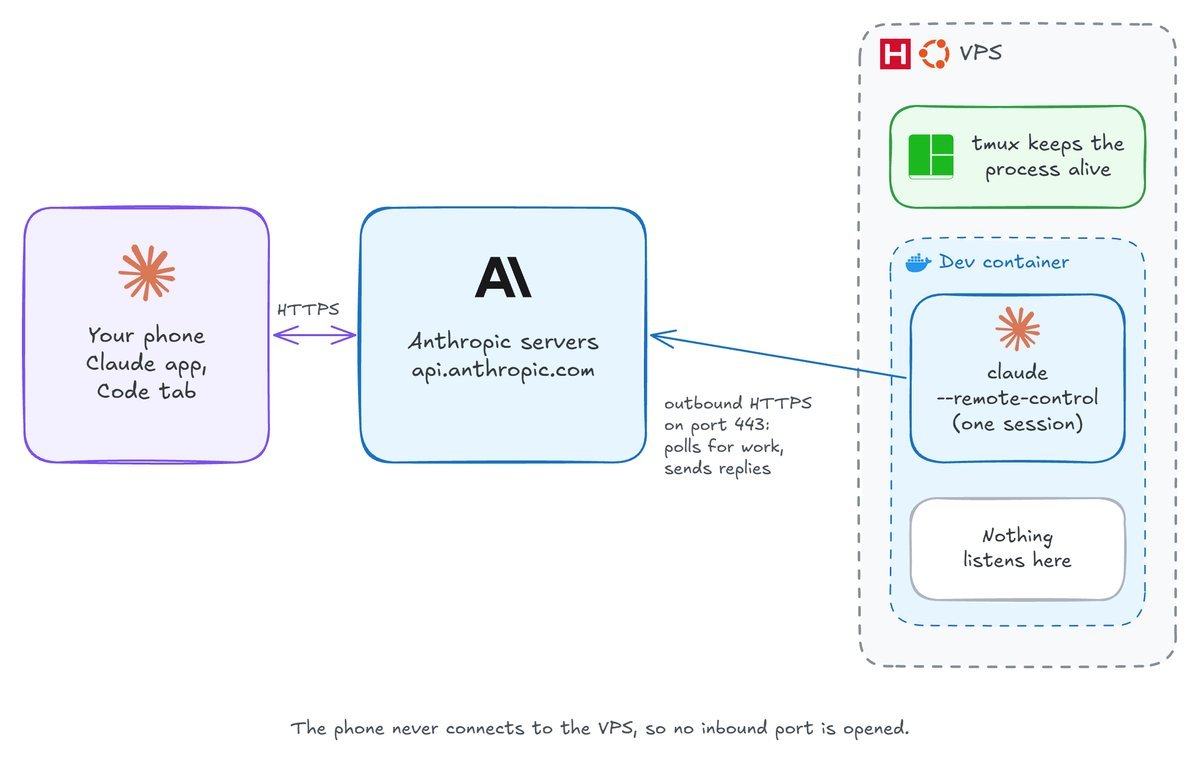
As a test, they asked Claude from a phone to build a live dashboard of the server. It was running in under three minutes. Claude never asked for permission because prompts were off, which the author says is acceptable only because the agent sits in a locked-down container. The phone and the server don’t talk to each other directly. Both connect to Anthropic’s servers.
Preparing the server
A Claude Code VPS setup needs an Ubuntu VPS and a non-root user that logs in with an SSH key. The author uses Hetzner with Ubuntu 24.04. Claude Code’s requirements list at least 4 GB of RAM, but the app Claude builds runs on the same machine, so builds, tests and a database share the same memory and CPU. More RAM helps.
Next come Docker, the docker group for your user, and the Dev Containers CLI, which starts these containers without VS Code. The CLI wants Node 20 or newer while Ubuntu 24.04 ships Node 18, so the guide pulls Node from NodeSource. Docker group members can reach root on the host, so don’t share that account.
The dev container
A dev container is a Docker container defined by a .devcontainer folder inside your repo. The author’s version has three files, adapted from Anthropic’s reference container for .NET 11. The key settings:
- Claude runs as a non-root user, because it refuses to skip permissions as root.
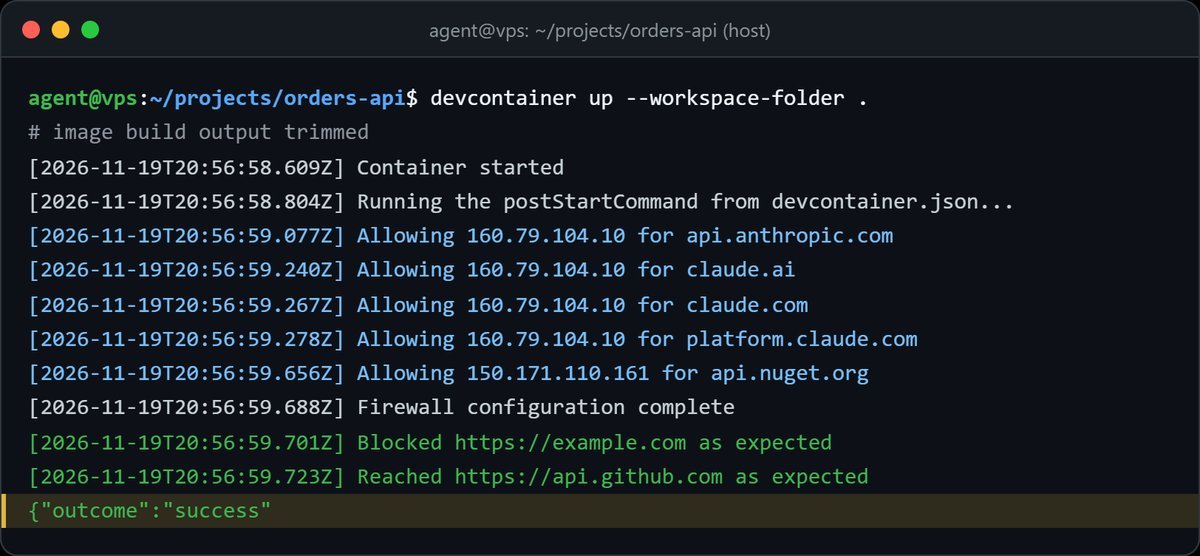
- Two capability flags, NET_ADMIN and NET_RAW, let the container build its own firewall, and a post-start command runs the firewall script on every start.
- A volume keeps the Claude login across rebuilds.
- A read-only mount keeps the agent from rewriting its own cage.
Claude Code is installed only in the image, so the sole copy on the server lives in the container. The firewall blocks outbound web traffic except for a short list of hosts, then confirms that example.com is unreachable and GitHub responds.
Logging in and starting Remote Control
Login happens once. The server has no browser, so Claude prints a URL. Open it on a laptop, authorize, and paste the returned code into the terminal. The login is saved in the volume.
Remote Control links a Claude Code session on the server to the Claude app on a phone and needs the subscription login, not an API key. The author starts it inside tmux, so the session survives closing SSH, with bypass permissions on. After that, the session shows up in the app’s Code tab with the same conversation. The author says they found no rule against this setup and points out that the Remote Control documentation describes a remote machine with tmux. Anthropic’s terms do prohibit sharing an account and reselling access, and the company doesn’t publish how it detects abuse, so there’s no guarantee.
The first phone task was a .NET 11 dashboard of CPU, memory and Claude’s own commands. The app serves on port 5080 within the container, a port that isn’t published, so the author viewed it through an SSH tunnel. A second task, a Minimal API with a test project, finished about a minute later with three passing tests.
How much web access to allow
The default firewall allows Anthropic, GitHub and NuGet. Claude sometimes needs more, such as documentation for a library updated after its training data.
WebSearch runs on Anthropic’s backend and returns titles and URLs, so it works behind this firewall. WebFetch downloads the page from inside the container, so the firewall rejects any host missing from the list. The author’s approach is to allow only what the work needs, leave WebSearch on, and add a documentation site such as learn.microsoft.com to the domains list when Claude has to read it. The script re-resolves each name every 10 seconds, since CDN addresses change.
The remaining risk
Any Claude Code VPS carries some exposure. The author keeps the allowlist short on purpose. With bypass permissions on, no prompt appears before a request leaves, and data inside the container can flow to any listed host. SSH and DNS stay open too. Anthropic advises this mode for isolated setups with no internet, which is why the author only uses it on repos they trust.
What to do first
Build the dev container and firewall before giving Claude any work, then start Remote Control in tmux. If you’re moving agents off a personal laptop, the Claude Code VPS pattern to copy is the separation of its own login, its own mounted repo and a firewall that blocks everything but the hosts the job needs.
Source: Milan Jovanović