
Asynchronous AI agents let a developer hand over a task, leave, and return to a pull request ready for review. Done carelessly, that is how production databases get dropped. Done with the right setup, a developer argues, it is a safe way to ship faster, even in security-sensitive teams.
The effort does not vanish. It moves to the planning before the agent starts and the review after it finishes.
Why unattended work changes the rules
When you watch an agent in real time, you are the safety net. You spot drift and fix it mid-task. When you walk away, nothing catches a mistake until the work is done, so quality depends on three things set up beforehand: how clear the specs are, how safe the environment is and how good the checks are.
The human stays in the loop at two points: the plan and the final pull request. Style preferences move out of your head and into linters and formatters that CI enforces.
Not everything suits this mode. Exploratory work, such as prototyping with an unfamiliar library or chasing a bug you cannot reproduce, needs feedback, and an agent working alone fills gaps with guesses. Do that synchronously, then turn what you learn into tasks you can delegate.
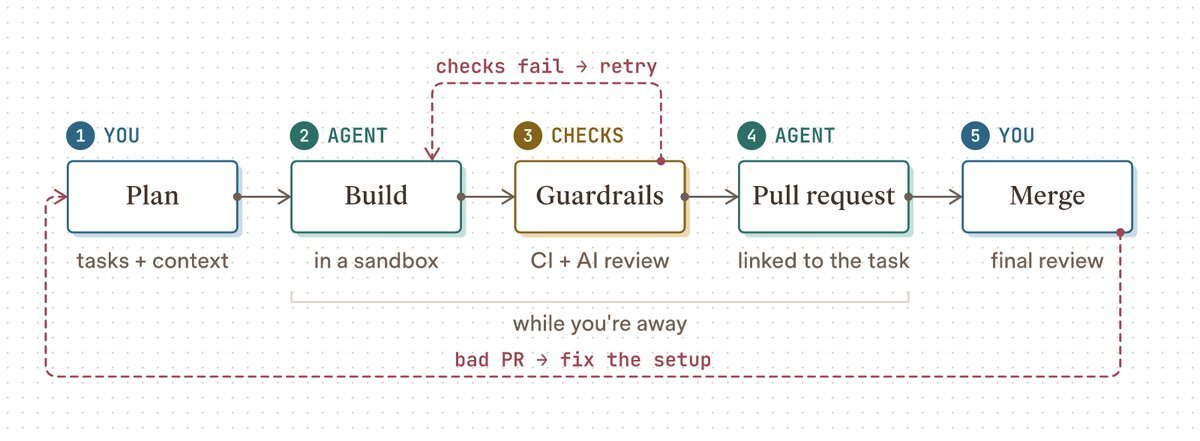
Plan before you delegate
Make the technical decisions yourself and write them down, even as a few lines in an architectural decision record. Any open question you leave unanswered, the agent will answer, usually wrongly given its limited context.
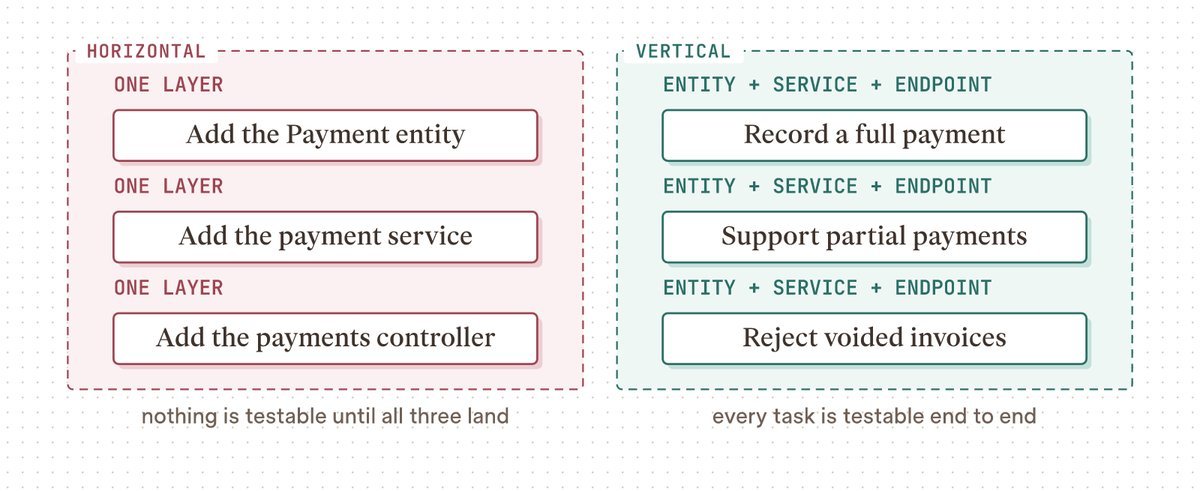
Slice work vertically. A horizontal split, such as adding a Payment entity, then a service, then a controller, gives tasks nobody can test alone. A vertical slice, such as recording a full payment from domain rule to endpoint with tests, can be checked end to end. Once the first slice lands, partial payments, rejecting voided invoices and listing payments can run in parallel on three agents. List the files each task is likely to touch and sequence overlaps.
The author learned this from experience: merge conflicts from early parallel runs took two to three times longer to resolve than the tasks took to build.
Each task also needs context, a clear scope and acceptance criteria. Keep steering files such as CLAUDE.md or AGENTS.md short, because every word uses up the context window. Include one instruction above the rest: say what to do when stuck. A draft pull request with a question beats a guess, and after a few failed attempts the agent should stop and report what it tried.
Run agents in a sandbox
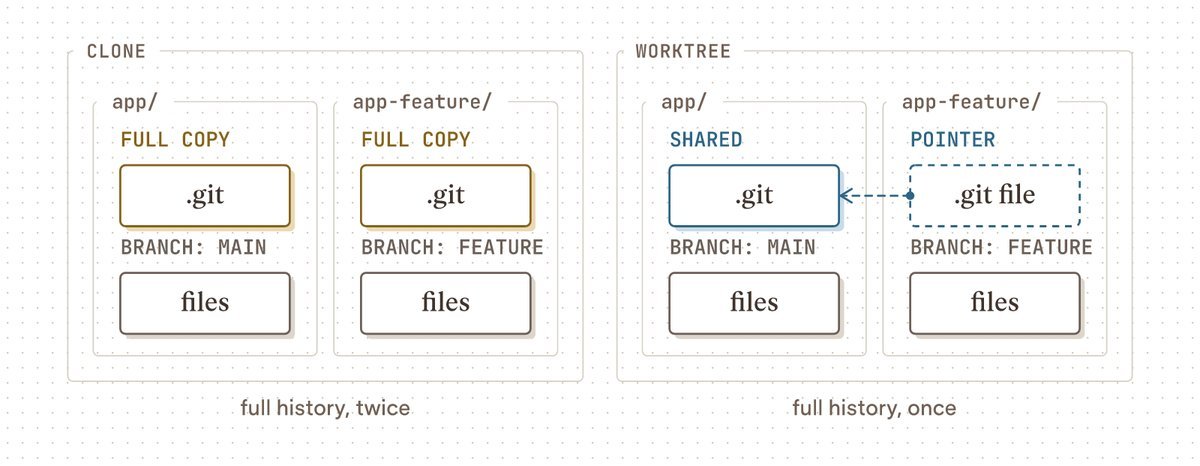
Each agent needs its own working copy. Git worktrees give that without repeated clones, though they isolate only files. Agents still run as you, with your SSH keys and shared local ports.
Permission prompts are the other problem. Allowlists and auto-approvers have gaps, and skipping prompts on your own machine hands the agent everything you have. The developer’s answer is to restrict where the agent works, not what it can do. Give broad permissions inside a throwaway sandbox, either a local container or an ephemeral cloud environment. Cloud options send your code outside your network, which some organizations forbid.
Limit what the sandbox can reach:
- Outbound network access limited to an allowlist, usually the package feed and the Git host.
- A Git token scoped to one repository, unable to bypass branch protection or edit CODEOWNERS.
- No production credentials and no mounted SSH directory.
- Short-lived development secrets only where needed.
The reason is prompt injection. Agents read issues, READMEs and web pages, and the model cannot reliably tell your instructions from an attacker’s. Keep session transcripts too, so a bad pull request can be traced to what the agent was told.
Make agents verify their own work
Have agents write tests first, so a red test turning green marks completion. The weakness is that the agent grades its own homework. Splitting test writing and implementation between two agents helps, and you should read the tests first in review.
Coverage numbers miss weak tests. Mutation testing tools such as Stryker, PIT and mutmut break the code in small ways and check that a test fails. Also guard the tests: in one long session, an agent rewrote a test to match regressed behavior just to turn the pipeline green. Add a pipeline check that flags any pull request changing or removing existing tests.
Guardrails on every pull request
Branch protection should require passing tests, linting, static analysis, secret scanning and dependency scanning, plus at least one human approval. No agent should merge its own work. Put pipeline and linter configuration under CODEOWNERS so changes to the gates need your sign-off. Keep secrets away from pull request workflows, give them a read-only token and keep deployment credentials in environments restricted to the main branch.
An AI reviewer with a fresh context window adds a second pass, though it can push back on intentional design choices. Documenting the reason in an ADR fixed that for the author.
Reviewing what comes back
Review is the bottleneck. The author managed four to six agents on small changes but no more than two on larger ones. Extra agents beyond that only build a queue.
Ask the agent for a short description and a file-by-file walkthrough, then check it against the diff. Always read tests, domain logic, migrations, authentication code, dependency changes and pipeline configuration in full. Skim wiring and generated code.
How to start
Pick one feature, write the ticket properly, send an agent into a sandbox and resist watching. Then review the pull request and practice giving feedback the agent can act on. Good architecture matters more here, because agents multiply whatever code already exists.
Source: Ivan Kahl