Fuzz testing finds bugs by pushing a program into undefined behavior. Coding agents can write the tests and fix the crashes, which makes AI fuzz testing attractive. It also puts the host machine at risk twice, from the target and from the agent. A coding tool called Prospero tackles that by running the agent inside a container with no network.
Why the host needs protection
Fuzzing is meant to break things. The target may misbehave in ugly ways, and the agent doing the work can make human-style mistakes. An agent that can run arbitrary code might delete or leak data it has access to, without any bad intent.
The developer behind Prospero argues that sandboxing and permission prompts only communicate intent and catch simple errors. They can’t contain an agent whose job includes running code. The safer assumption is that an agent can do anything its tooling can do.
How the container session works
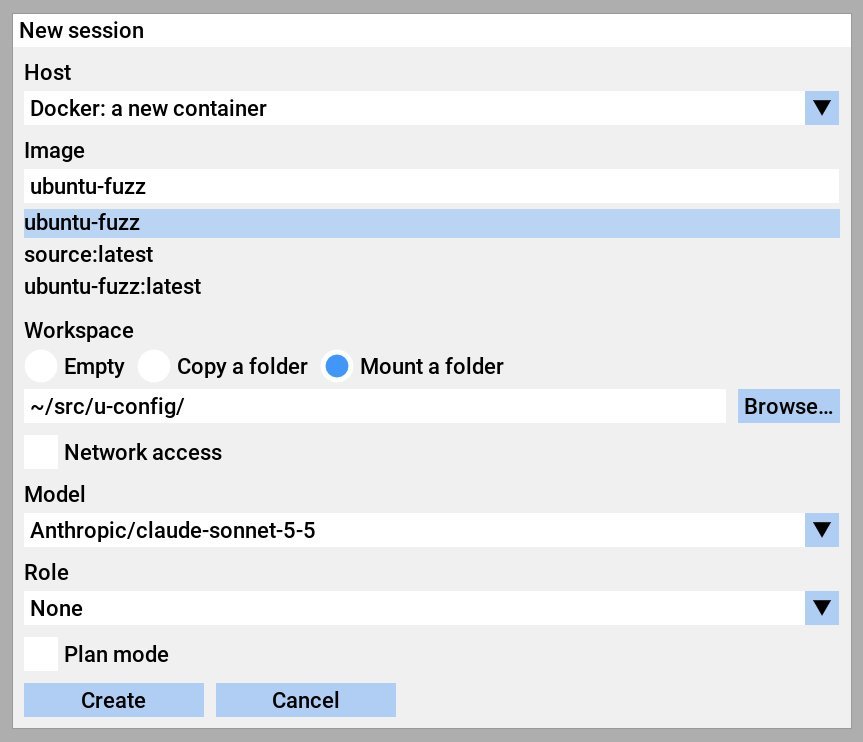
When you create a session in Prospero, you pick “new container” as the host. You then choose an image, whether networking is on, and what goes in the workspace. You can copy your repository in or mount it.
Mounting is the recommended route because the agent can commit fixes directly and nothing has to be extracted later. If the agent could damage the repository, give it its own clone rather than a worktree. With networking off, the agent can’t push or pull, but you can.
Prospero starts a headless agent runtime inside the container, precompiled for Linux. The graphical interface connects to it over a pipe and shows it as an ordinary local session. Chat completions are relayed from outside, which is how the agent works without a network. If you grant permission, web search and fetch requests are relayed too, so the agent can look something up or download a dependency without full internet access. The headless engines come with the Professional Edition.
If you close the interface, the container runtime keeps running until it needs the relay, then pauses. The terminal pane opens a shell inside the container, and the files pane works there too. For a mounted container it can open files in your editor. To hand the agent a file, copy it into the mounted directory on the host.
Building the image
The one-time setup is an image holding what an agent might need: compilers, fuzzers, debuggers, build tools and dependencies. The example Dockerfile starts from Ubuntu 26.04 and installs build-essential, Clang, LLD, CMake, Ninja, GDB and similar tools. It builds AFL++ 5.03c from source, checking a SHA-256 hash, because no Linux distribution has shipped a working AFL++ for some years. With GCC and Clang both available, you get slightly different instrumentation and catch different defects.
The image also sets sanitizer options as hints for the agent. Build it with docker build -t ubuntu-fuzz .. You can also describe your environment to an agent and let it write the image for you.
The prompt and the models
The instruction can be short: add libFuzzer and AFL++ tests to the project, run a campaign under ASan, UBSan, -D_FORTIFY_SOURCE and -D_GLIBCXX_DEBUG, and commit fixes as they are found. For large projects, Plan mode may help. Start a long campaign before bed and you may wake up to fix commits. If you do this often, a skill can hold the prompt.
Model choice is forgiving. Mid-tier models work well as campaign drivers, and so do many smaller or local ones, since writing fuzz tests and fixing off-by-one errors takes little. The bigger obstacle is refusals. Too many models are trained to treat fuzzing as an offensive technique, when it is routine testing for anyone serious about software quality.
A quick way to try it
If your own projects don’t suit fuzzing, pick an open-source project that hasn’t had much of it. Containment keeps the risk low, and the fixes that come out tend to be simple enough to send upstream. The GNU Recutils source is a good first target. Its latest release, 1.9, is full of low-hanging bugs, and a dozen commits fixing buffer overflows and similar problems can appear within minutes.
Source: nullprogram.com