A team building an AI assistant platform has detailed how it runs untrusted, model-written programs on its own servers. The AI code sandbox is a locked-down Docker container with no credentials, no database and no network access, and it exists because the assistant now writes Node.js scripts that build PowerPoint decks for clients.
The assistant originally filled a fixed set of slide layouts from a JSON structure, which meant nothing the model wrote ever ran. The team dropped that approach. A script written against pptxgenjs can produce real text boxes, tables and native charts that stay editable in PowerPoint, and it isn’t limited to a preset list of deck types.
Why the team built its own environment
All three model vendors the company uses offer hosted code execution. The team passed on it. Two of the three run only Python, while the deck library is Node. The bigger issue was resilience: the product chains models from three vendors with fallbacks, so a feature tied to one vendor’s container fails when that vendor does.
Privacy played a part too. A deck is built from a client’s strategy documents, and the team didn’t want those executing in a third party’s environment. Brand files such as logos and licensed fonts never reach the model either. It sees references like asset://bm_7f3a, and the app swaps in the real file only as it enters the sandbox.
What a hostile script could target
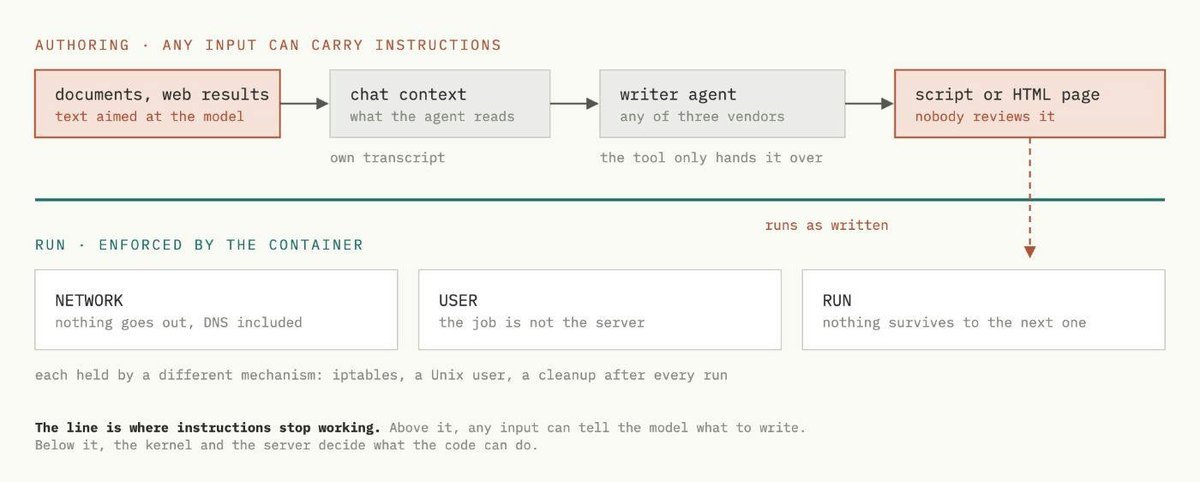
The script is untrusted because the model writes it after reading chat messages, uploaded documents and web search results, any of which can carry hidden instructions. The team listed four targets:
- The network, where a script could send out client content or brand files, or reach neighbouring services.
- The next run, since builds for different clients share one service.
- The service itself, which runs other people’s code all day.
- The person who later opens the generated file.
A service that holds nothing
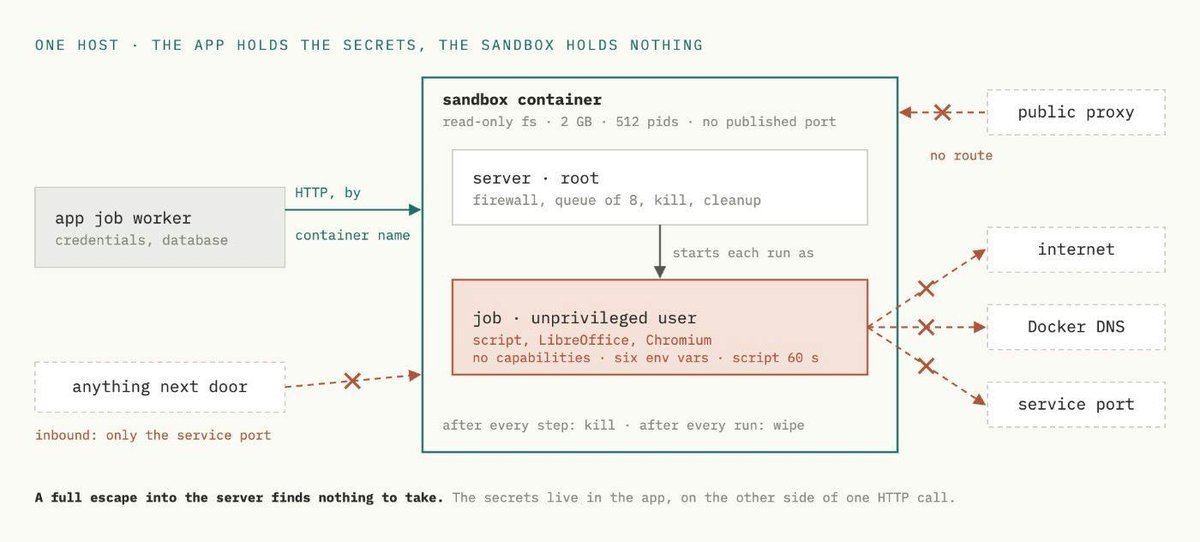
The sandbox is a small HTTP service on a Debian image with Node 22, LibreOffice, Poppler and Chromium. It has no credentials, no state between runs, no published port and no route from the public proxy. It is deployed with Kamal next to the job workers. If a script took full control of it, there would be nothing worth stealing.
At startup the container flushes its outbound firewall rules, allows loopback and replies to established connections, and drops everything else. It also blocks Docker’s embedded DNS resolver, because name resolution is a data channel of its own. The same rules apply to IPv6. If the container can’t set its firewall, it refuses to start. Chromium gets matching treatment: every request is answered by the sandbox itself or refused, and WebRTC, popups and form submissions go nowhere.
Separating the job from the server
The server stays root so it can maintain the firewall and kill leftover processes. Scripts, file checks, LibreOffice and the Poppler tools run as a separate unprivileged user with no capabilities. The container drops all capabilities except seven, uses a read-only filesystem apart from a 1 GB work area and a 256 MB temp area, and is capped at 2 GB of memory and 512 processes.
Runs go one at a time. After each step the server kills every process the job user owns, then deletes the run directory, empties shared temp locations and removes System V IPC objects. Limits include 60 seconds per script, 20 MB per deck, 30 slides and 40 MB of slide images. The server reads output only if it’s a regular file, so a symlink posing as a deck is refused.
Checking the file that comes out
A .pptx is a zip of XML files, and PowerPoint fetches remote targets when a deck opens. A picture hosted on another server reveals who opened the file and when. A picture on a network share can make the reader’s machine try to sign in. The check therefore rejects any deck pointing outside itself, apart from ordinary web or mail hyperlinks. It also rejects OLE objects, packaged files, ActiveX controls, macros, duplicate archive parts and any data before or after the archive.
The ordinary test suite can’t verify any of this, since a developer’s machine has no firewall or job-user switch. A second mode builds the image, runs it with production flags beside a neighbouring container, and tests from inside a job. It checks that the job can’t reach the neighbour over TCP, UDP or IPv6, can’t resolve names and leaves nothing behind. The publishing workflow pushes the image only if those tests pass.
What the screenshots changed
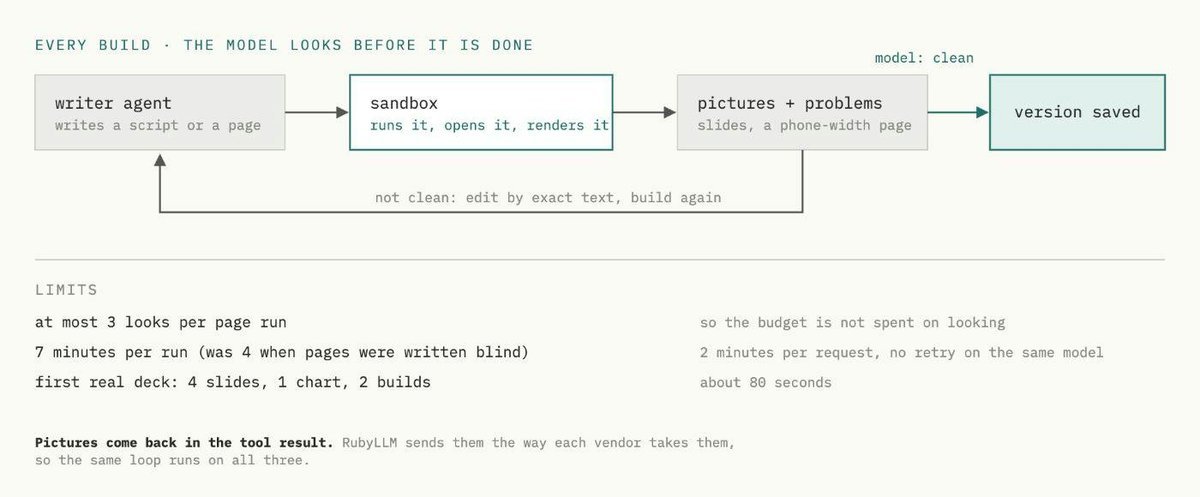
Every build returns a picture of each slide, and the model fixes what it sees. A page written blind kept a risk table that ran off a phone screen; once the model could look, it rebuilt the table as cards. The first real deck run, four slides and one chart over two builds, took about 80 seconds.
Edits are slower now. A change to a page that took seconds takes about a minute, because each one is opened and inspected again. The team removed a fast path for small edits for that reason. The time budget rose from 4 minutes to 7, a page gets at most three looks per run, and the 30-slide limit doubles as a cost cap.
Limits and what comes next
Because runs are serialized, two people asking for decks wait on each other, and the app treats the sandbox as unavailable after 5 minutes. If it’s down, the assistant says it couldn’t build the artifact. A hardened container is also weaker than a virtual machine. The team is considering gVisor, which gives the container its own user-space kernel, or Docker Sandboxes, which run a microVM per job but need KVM and likely a separate host.
Its advice for anyone building an AI code sandbox: design for what the service holds before what it blocks, treat model-written scripts like uploaded files, inspect every output format, and run isolation tests inside the container, where the firewall actually lives.
Source: hackernoon.com