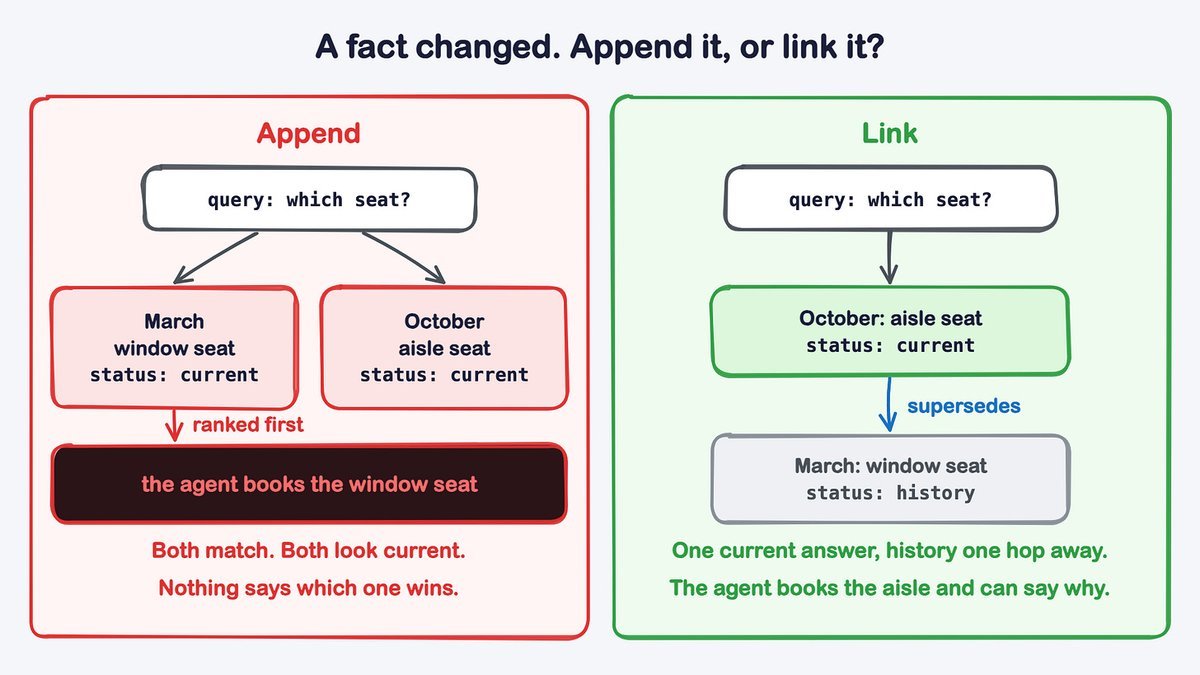
Picture a trip-planning agent. In March a customer asks for window seats on long flights. In October she asks for the aisle instead. A week on, the agent books a window. No error is logged, which is exactly why this kind of AI agent memory bug is hard to catch.
Both records match a search for “seat preference”, both look current, and nothing ranks one above the other. Backend teams dealt with the same problem in ordinary databases long ago. Seven design decisions bring those lessons to agents.
Keep facts and transcripts separate
Good AI agent memory holds distilled facts, such as a preference for aisle seats on long flights. The 40-message conversation that produced it belongs in a log. Searching raw chat at recall time returns noise, and one fact in five phrasings fights for space in the prompt.
Scope before you rank
Apply tenant and user filters before similarity search begins. Add a trip filter only when a fact belongs to a single trip. Ranking only orders results; it can’t stop another customer’s passport details from reaching the prompt.
A query with no user attached should raise an error instead of scanning every account. Also check that the vector index filters during the search. Many approximate indexes filter afterward, so a per-user query can return nothing.

Combine semantic and keyword search, then rerank
Semantic questions like “which seat does she like?” must reach a note that says she prefers sitting by the aisle, though the wording barely overlaps. Vector search covers that case. Exact identifiers, such as booking reference K7Q2XM, are better served by keyword search.
Run both within the scope above, then:
- Fuse the two result lists with reciprocal rank fusion, which uses positions only. An item high on both lists stays high.
- Rerank the leaders with a slower model that scores each one against the question.
Test every stage on your own data. Fusion by itself can do worse than one strong search.
Link changed facts instead of overwriting them
This is the fix for the seat bug. Overwriting destroys the history the agent needs to explain a change (“you moved to aisle seats in October”). Appending leaves two facts that both look live.
Data warehouses already handle this. When history matters, they close the old row, open a new one and mark the latest as current, which Kimball calls a type 2 slowly changing dimension. Memory can follow the same pattern: keep both facts, connect them with a “supersedes” link, and flag the older one as retired. Searches then return October’s preference first, with March’s attached as background.
Run the swap inside one database transaction. Give each fact a slot key, for example user plus “seat preference”, and put a unique index on current rows only. Decide whether the fact changed before opening the transaction, so a slow model call doesn’t hold it open. Inside, retire the exact old fact first and then insert the new one with its link. If the retire step finds the fact already retired, or the insert violates the index, another writer won. Roll back and start again.
When a change comes up mid-conversation, the extraction step must spot it. Record the message id and position with each fact so an earlier message can’t overwrite a later one, and skip the write when the slot already holds a fact from the same message.
Follow links one hop and set defaults deliberately
Linked records bring back history but can crowd the prompt. Start at one hop with a small cap. The agent sees October’s aisle choice on top, March’s window beneath, and can explain its booking.
Look at what your memory library returns for superseded records by default. If retired facts still land in the prompt and the builder ignores their status, the link does nothing.
Budget tokens, not rows
Ten results can be 5,000 tokens or 200. A larger context window doesn’t fix that. The Lost in the Middle study found models tend to do best with relevant text near the start or end of a prompt, with significant degradation in the middle, and extra memories can push the important one there.
Cap tokens instead of row counts, and choose the cap type knowingly. A hard cap never overflows, even if that means returning nothing. A soft cap is a target. Pick hard for fixed prompt slots and soft where an empty answer would be worse than a long one.
Test the update path
Many suites only ask whether the agent remembers. The failure in production is missing a change. Write a test that states a fact in session one, changes it in session three and asks in session five a question only the new value can answer. Fail the build if the old value surfaces as current, and rerun it whenever extraction, linking or retrieval settings change.
LongMemEval names knowledge updates as one of five long-term memory skills it measures, and reports a 30% accuracy drop for commercial chat assistants and long-context models across sustained interactions.
Where to start
If you can change only one thing, look at the write path of your AI agent memory. Find where a memory is saved and ask what happens when the same fact comes in with a new value. If the answer is “we append it”, you have the seat bug.
Source: thetshaped.dev