
Anthropic is letting users convert Claude artifacts into Claude desktop apps. A beta feature called “Install as app” is rolling out in Claude for Mac and Windows. An installed artifact gets its own icon, launches in a separate window and can be passed to other people.
It also has to ask before it interacts with the computer, and users decide how much to allow.
What changes for users
Once installed, an app no longer lives inside a Claude conversation. It can call Claude and the user’s connectors, and edits to the source artifact flow through automatically. Anything the app asks Claude to do counts against the owner’s plan usage.
The idea reflects how people use artifacts. They began as work products such as a chart or a page. Now many serve as daily tools, for example a meeting prep page that pulls from calendar and email on a schedule, or a tracker listing orders that must ship today. Anthropic’s reasoning is that a work tool should open like any other app and be able to get your attention.
Installed apps can push notifications and place items in the menu bar or system tray. Team and Enterprise admins can switch app permissions and full access on or off for their organizations.
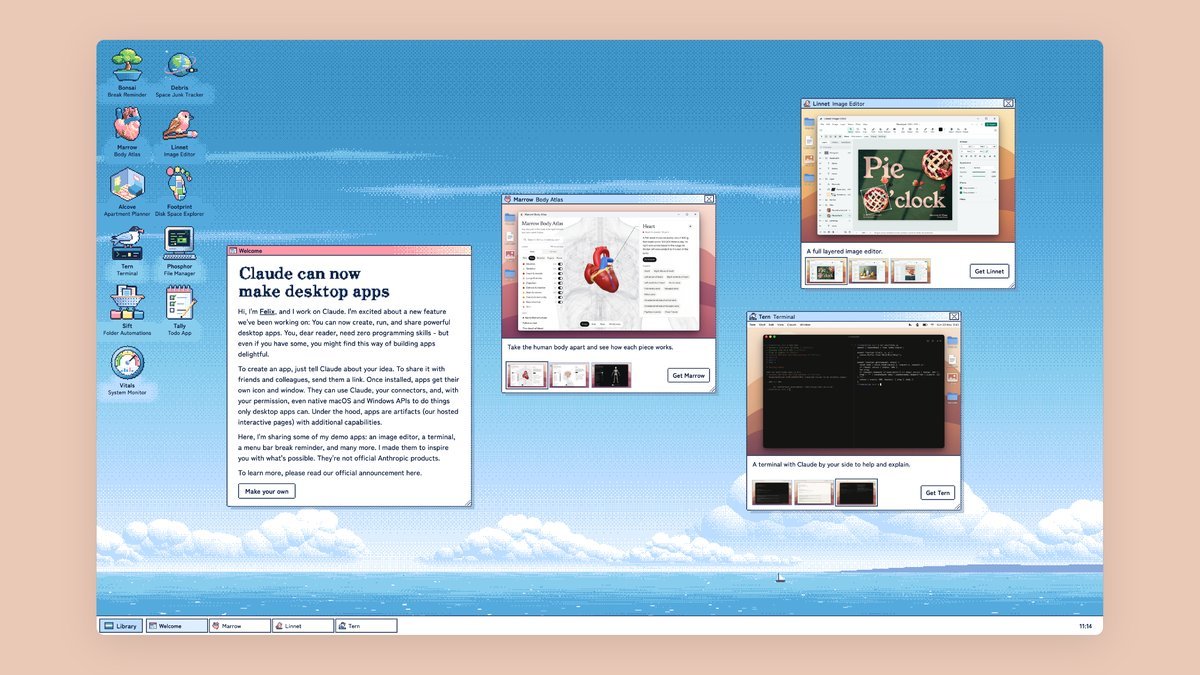
Demo apps built at Anthropic
Anthropic staff made a handful of examples:
- Linnet, an image editor with layers
- Phosphor, a file manager with a cinematic look
- Sift, which creates folder rules and uses Claude for tidying files
- Tern, a terminal that has Claude on hand to assist and explain
- Vitals, a menu bar and tray monitor for system performance
An engineer at the company has published further demos.
The three permission tiers
By default an app can do only what a web page can. With app permissions, it may request tightly managed features: windows that stay on top, global keyboard shortcuts and notifications. With full computer access, it may request the ability to run programs and to read, edit or delete files with no prompt each time.
Approval applies to one version only. After any update, including the owner’s own edits, Claude asks again. Content that an app pulls from another website can change without a fresh prompt.
Full access is available only for apps you built yourself or, on Team and Enterprise, ones built by colleagues. Because Anthropic doesn’t review apps before installation, it urges users to grant that access only to apps they trust.
Why Anthropic is doing this
For many people, a useful artifact is something they open again and again. Keeping it buried in a chat history means hunting for it each time. Giving it a dock or taskbar icon puts it next to the browser and the calendar, and notifications let it speak up when an order is late or a meeting is about to start.
It also changes who can build. A knowledge worker can describe a small tool in plain language and end up with something that behaves like a normal desktop program. A developer can skip the packaging work that usually comes with shipping one, because an installed app doesn’t need to be signed and doesn’t need its own login.
Sharing and trust
Apps can be shared, which raises the question of who vouches for them. Anthropic says plainly that it does not review apps before people install them. The permission design reflects that: nothing gets more than browser-level rights unless the user agrees, the approval resets with every version, and the strongest access is restricted to apps made by the user or the user’s own organization.
Admins on Team and Enterprise plans hold the final switch for their organizations, so a company can allow ordinary app permissions while keeping full computer access shut off.
Availability and limits
The beta covers all plans. Team accounts have it on with full access off. On Enterprise it stays off until an account owner enables it. HIPAA-ready organizations and hybrid deployments are excluded. Opening an app needs an internet connection and a signed-in Claude account. Claude Docs, Slides and Sheets can’t be installed.
Making your first app
Update the Claude app, describe what you want, try the result as an artifact, then pick “Install as app” from the Share menu. No packaging, signing or API key is needed, since the app runs on the user’s Claude account.
What to watch next
Since apps aren’t vetted, the full-access tier will be the first place trouble shows up. How many organizations turn the feature on, and what admins permit, will show whether Claude desktop apps stay personal tools or spread across companies.
Source: Claude