OpenFruit, a new open-source project, lets developers build iOS apps on Windows with no Mac in the loop. Point it at an ordinary Xcode project and it produces a signed app that installs on a connected iPhone. Compiling Swift for the phone is the easy bit. The work lies in reproducing everything Xcode does around the compiler.
Swift already runs on Windows, and Clang has long been able to target arm64-apple-ios. What a real app adds is Xcode’s project format and settings logic, Apple’s iOS SDK, tools shipped only for macOS, resource compilers, and signing plus packaging.
The ground rule: leave the project alone
The author’s team set one constraint for the whole tool. Nothing in a developer’s repository gets edited, not source files, Package.swift, .pbxproj or .xcconfig, and there are no special switches for individual apps. If a build breaks, the answer must be a general implementation of whatever Xcode behavior was missing. Nextcloud, VLC, Delta and Swiftfin act as regression tests rather than exceptions.
Working out what a setting really means
A .pbxproj file is simple to read. The hard part is deciding the final value of a build setting, because Xcode layers defaults, project, target and .xcconfig values, and each layer can refer back to the one beneath it. Settings can also carry conditions on configuration, SDK, architecture and variant, and OpenFruit picks the most specific match. A condition it doesn’t understand halts the build with an error.
A few smaller rules cause trouble in real projects. An app can compile against the iOS 27 SDK yet support iOS 15, since those are separate settings. XCFramework slices are chosen from the metadata inside the framework, so a device build can’t pick up a simulator slice by name. VLC still contains a Swift 4 target, and fixing it meant copying swift-build’s own policy of disabling explicit modules and compilation caching below Swift 5.
Obtaining the iOS SDK without a Mac
OpenFruit bundles nothing from Apple. Each user downloads Xcode through their own Apple account, and the login session is kept encrypted by Windows DPAPI. The tool chooses a suitable Xcode build from Apple’s live catalog, then pulls the iOS SDK from it.
The download is a .xip, which nests XAR, PBZX and CPIO formats. OpenFruit streams the contents with caps on table size, decoder memory and entry counts, and checks the digest, signature, certificate chain and revocation status before it accepts an SDK.
Running Apple’s Swift macros on Windows
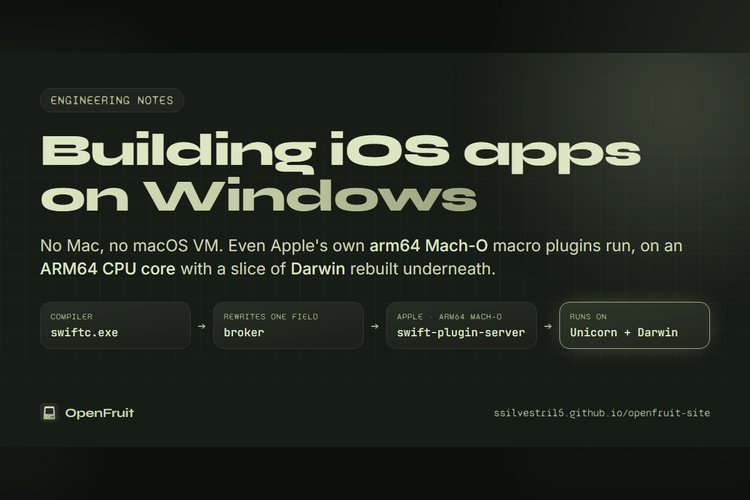
This was the toughest piece. Swift macros are separate compiler plugins. Those from packages come with source, so OpenFruit builds them as Windows DLLs. Apple’s own macros, including the ones behind SwiftUI’s @State, are shipped only as arm64 Mach-O binaries within Xcode.
Rewriting them by hand would violate the no-patching rule and go stale whenever Apple changes a macro. Instead OpenFruit executes the originals. It uses the Unicorn 2.1.4 AArch64 CPU core and supplies just the portions of Darwin that the macOS plugin server touches: loading Mach-O images and the dyld shared cache, Mach memory, ports and threads, BSD system calls and clocks. Any call it hasn’t implemented raises an error rather than pretending to work.
The plugin server also needs macOS system libraries. OpenFruit fetches them from Apple’s public restore image, a 26.6 GB ZIP64 archive, using HTTP range requests so it needn’t download all of it. It decrypts and verifies the system volume, reads the APFS image directly and extracts the dyld shared cache, which spans a main file and 79 subcaches totaling about 7 GB.
The Windows Swift compiler only discovers plugins ending in .dll, so OpenFruit passes the -load-resolved-plugin option via -Xfrontend. A small broker between compiler and plugin host rewrites one path field so the original dyld accepts it. Other messages go through unchanged.
Storyboards, signing and installation
Apple’s ibtool, which compiles storyboards, runs only on a Mac. OpenFruit replaces it with OpenIB, a C++20 compiler built from scratch that emits the binary NIBArchive files UIKit reads. Nextcloud and Delta storyboards compiled this way load on a real iPhone.
Signing reads entitlements from the same build settings. The open-source zsign writes the signature, and OpenFruit then double-checks every Mach-O by examining the CodeDirectory and computing the CDHash. Putting the app on the phone needs no iTunes. Only Apple’s USB driver, included in the Apple Devices app, comes from outside.
Current limits and how to help
Several open-source apps, including the four above, now go from a fresh checkout to a signed IPA that runs on an iPhone with an unchanged repository, using arm64 and the iOS 27.2 SDK. Still, the project is experimental. Some SwiftPM package resources aren’t built yet, Icon Composer icons lose their Liquid Glass effects, and capabilities tied to another team’s account can’t be provisioned.
The source is on GitHub, and the maintainers say the most helpful report is an open-source app that fails, along with its first error. Anyone wanting to build iOS apps on Windows should expect rough edges for now.
Source: ssilvestri15.github.io